
Dedicated circuit for home office: check your power needs
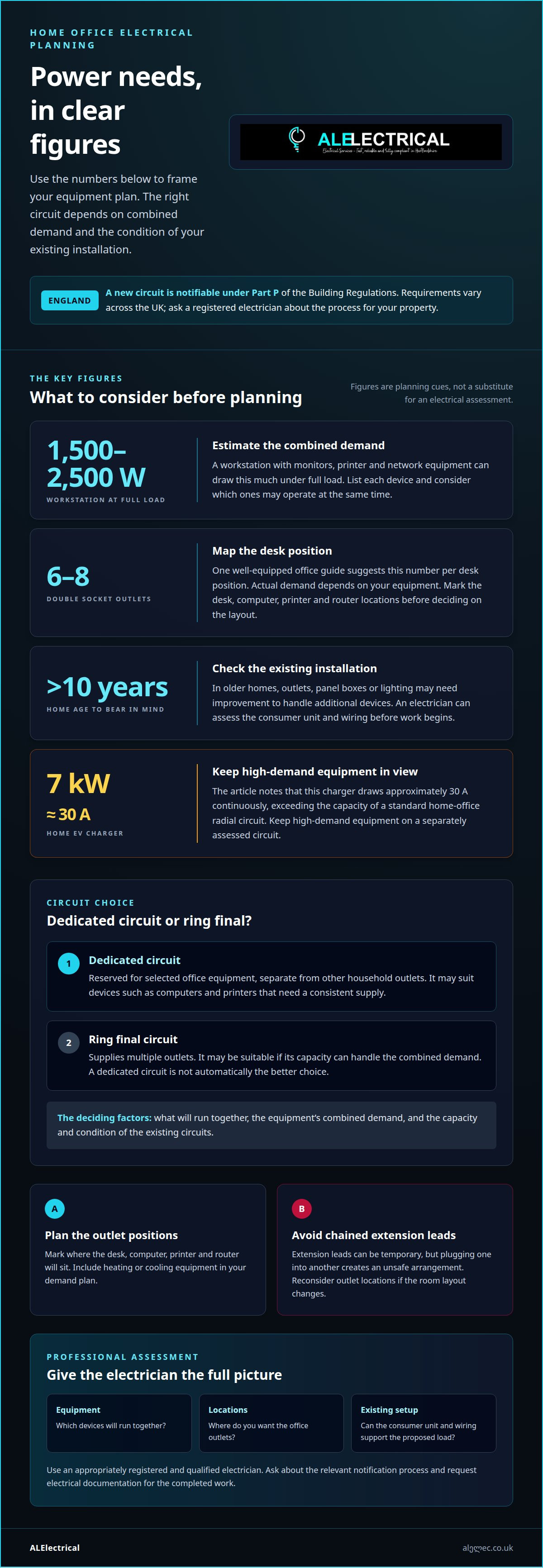
More sockets won’t solve every home-office power problem. A dedicated circuit for a home office is a separate electrical circuit reserved for office equipment, rather than shared with household outlets or appliances. In England, adding a new circuit is notifiable under Part P of the Building Regulations.
Consider all the equipment you plan to run, including computers, monitors, printers and any heating or cooling equipment. The combined demand and condition of your existing electrical system help determine whether a separate circuit is suitable.
This guide explains how a dedicated circuit works, how to assess your office equipment’s power needs and when to use a registered electrician. It also covers the risks of overloaded sockets and chained extension leads, and what to consider before making changes.
Table of Contents
Using a registered electrician to install a circuit
A qualified electrician can assess whether your household wiring and consumer unit can support a separate office circuit. This is important if you need a dependable supply for a computer, printer and other equipment.
Panel Upgrades and New Wiring
A panel upgrade replaces or improves the consumer unit, whilst new wiring creates the electrical route from it to the office outlet. Both may be needed if the existing installation cannot safely accommodate the proposed load. A home office with substantial electrical needs may require a panel upgrade and new wiring. For homes more than 10 years old, upgrades or improvements to outlets, panel boxes and lighting may be needed to handle additional devices. An electrician can assess the installation before work begins.
Approval and Certification Requirements
In England, adding a new circuit is notifiable under Part P of the Building Regulations, so the work must follow the applicable notification process. Building Regulations and certification arrangements vary across England, Scotland, Wales and Northern Ireland; the rule in England should not be assumed to apply identically elsewhere. Ask a registered electrician to explain the relevant process for your property and provide electrical documentation for the completed work. This gives you a record of what was installed and tested.
Use an appropriately registered and qualified electrician rather than attempting electrical installation or maintenance yourself. Electrical work can be dangerous and costly if carried out incorrectly. Check that the electrician’s registration and qualifications are suitable for the work. Before it begins, explain which devices will run together and where you want the office outlets. This helps the electrician assess the circuit and installation.
In an older home, arrange an electrical maintenance assessment before setting up your office. A qualified electrician can check whether the consumer unit, wiring and outlets need attention, then advise whether a new circuit or more extensive work is suitable.
Assessing office equipment power requirements
A dedicated circuit isn’t automatically better than a ring final circuit. The right choice depends on the equipment’s demand and the capacity of existing circuits. A separate supply may suit office equipment that needs reliable power without sharing a circuit with household devices.
Matching Circuits to Equipment Needs
A dedicated circuit serves selected office equipment separately from other household outlets. This can help computers and printers receive a reliable supply, particularly when several devices operate together. A workstation, monitors, printer and network equipment can draw 1,500 to 2,500 W under full load. List each device and consider which may run simultaneously. Most laser printers, especially speciality models, may benefit from a dedicated circuit; a heat press should be separate from its printer.
Mapping Equipment and Outlet Locations
Plan where each device will sit before deciding on the electrical layout. Mark the desk, computer, printer and router locations, then note the outlets each will need. Planning ahead can reduce reliance on daisy-chained extension leads, which can be unsafe. One well-equipped office guide suggests six to eight double socket outlets per desk position; actual demand depends on the equipment you use.
Dedicated Circuits and Ring Final Circuits
A ring final circuit supplies multiple outlets, while a dedicated circuit is reserved for specific equipment. A ring circuit may be suitable for a home office if its capacity can handle the combined demand. A dedicated circuit can keep office equipment separate from other household loads, which may matter for computers or printers that need a consistent supply. A qualified electrician can assess your equipment and existing circuits together.
Unreliable or insufficient power can affect sensitive device components. Printer problems may include toner that fails to fuse properly or ghosted images. Computers and printers can also be affected by surges or other supply issues. Include heat in your plans: computers and printers produce warmth, and cooling equipment may be needed to keep the workspace comfortable.
Avoiding overloaded circuits and extension cords
Computers, monitors, printers and routers can overload a household circuit when several run at once, potentially interrupting service or damaging equipment. Include heating equipment in your plans, too, as it adds to demand when used alongside work devices. Consider which appliances will run simultaneously, not just how many plugs the desk needs.
Extension leads can provide a temporary connection, but plugging one lead into another creates an unsafe arrangement. Plan the positions of your desk, printer and network equipment so each can reach a suitable outlet without daisy-chained leads. If the room layout changes, review the outlet plan instead of adding more extensions. The number of devices, their combined demand and the condition of the existing circuit all affect whether the setup is safe.
A computer circuit with its own breaker can supply the computer without drawing from other connected circuits. That separation may help reduce interruptions caused by other household loads. A home office radial circuit also has limits: a 7 kW home EV charger draws approximately 30 A continuously, exceeding the capacity of a standard home-office radial circuit. Keep high-demand equipment such as an EV charger on a separately assessed circuit.
Frequent interruptions while using printers, computers or heating equipment are a reason to review the circuit rather than add another extension. Note which devices were running and their connection points; this gives an electrician useful details when assessing the installation. If you need help assessing the electrical condition of your home, arrange electrical maintenance before expanding your office setup.
ALElectrical: House Rewires
ALElectrical can help if planning your home office reveals wider electrical work is needed, such as addressing outdated wiring or a consumer unit that needs attention. A House Rewire and a Fuse Box Upgrade address different parts of the installation, while an EICR assesses its electrical condition. These services may be relevant if an assessment identifies concerns beyond adding an office outlet.
If the existing system needs broader improvement, a House Rewire may be more appropriate than treating one socket as an isolated issue. If the consumer unit is the concern, a Fuse Box Upgrade may be the next step. An EICR assesses the installation and can help clarify what needs attention.
Contact ALElectrical to discuss the electrical work identified for your home office.
Plan your workspace for what comes next
A dedicated circuit for your home office should suit the way you work now and the equipment you may add later. Before making changes, consider whether the room might also need different lighting, extra sockets or a new layout. Sharing these plans with an electrician helps them assess the installation as a whole, rather than treating one outlet as an isolated change.
If that assessment points to wider electrical work, ALElectrical offers House Rewires, Fuse Box Upgrades and Solar & Battery services. The right option depends on what your property needs, so focus first on the condition of the installation and your plans for the workspace.
Contact ALElectrical about your home office circuit and take the next step towards a workspace planned around your needs.
Frequently Asked Questions
What is a Dedicated Circuit?
A dedicated circuit has its own circuit breaker and supplies designated equipment or an outlet. Unlike a shared household circuit, it isn’t connected to other sockets and appliances that draw power from it. For example, a home office circuit could supply selected work equipment, keeping it separate from devices elsewhere in the home.
Does a home office need a dedicated electrical circuit in the UK?
A dedicated circuit for a home office isn’t necessary in every UK home. The deciding factors are the combined demand of equipment running at the same time and the capacity and condition of the existing installation. A computer and monitor may place different demands on a circuit than a setup that also includes a printer, heater or other high-demand device.
What electrical equipment needs a dedicated circuit in a home office?
Equipment with substantial or sensitive power needs may benefit from a separate supply. Laser printers, particularly speciality models, can require reliable power to print properly; a heat press should use a separate circuit from its printer. Include computers, monitors and network equipment in the load assessment, along with any cooling equipment that will run during working hours.
Can a home office circuit be added to an existing consumer unit?
It may be possible, but the consumer unit and existing installation must be assessed first. The electrician will consider available capacity, the proposed office load and the condition of the wiring. If the consumer unit can’t accommodate the additional circuit, an upgrade or other electrical work may be needed. The answer depends on the installation, not simply the age of the computer equipment.
What circuit breaker rating and cable size are suitable for a home office?
One suggested arrangement is a 20 A radial circuit using 2.5 mm² twin-and-earth cable, a 20 A MCB and a 30 mA RCBO. These details aren’t a universal specification for every home office. The appropriate design depends on the equipment load and the installation, so a qualified electrician should assess the circuit before installation.



Comments